🎶 Music Emoji — Meaning & Copy
Multiple Musical Notes · Unicode U+1F3B6 · page updated November 04, 2026
What the music emoji means
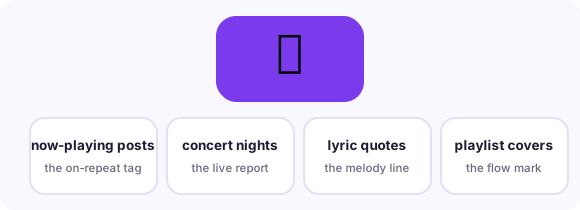
The 🎶 emoji - officially Multiple Musical Notes - is a beamed pair of eighth notes, and it is the flowing-music emoji: songs playing, playlists open, lyrics hitting, and anything that moves rather than sits. Its single sibling 🎵 (Musical Note, U+1F3B5) marks one note - a beep, a ringtone, a single hit - while 🎶 means the music is ongoing, which is why captions, concert posts and 'what I am listening to' updates default to the pair. It joined Unicode in 2010. In slang it also marks melody references in text: quoting a lyric, describing something as 'a whole song,' or tagging the soundtrack of a moment.
When people use it — three real scenarios
Now-playing and playlist posts
The canonical use: song title plus 🎶 is the universal 'on repeat' format across platforms.
Concert and live-music moments
Show nights, festival lineups and stage photos take 🎶 over 🎤 (which marks the performer).
Lyric quoting and mood tags
When a sentence is sung rather than said, 🎶 flags the melody line - the text version of italics for music.
Combinations that read like a sentence
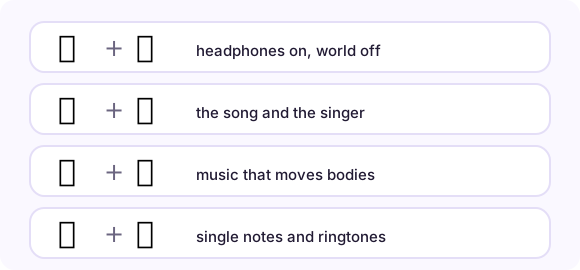
Emoji stack into phrases. These pairs (and the full strings you can copy from each row) are the combinations real conversations settled on:
How it renders on different platforms
Both note emoji render as solid musical notation on every platform - among the least variable emoji in the set, since notation is standardized notation. Choose by count and motion: one static sound = 🎵, flowing music = 🎶 (this mirrors how music apps pair them in their own UIs). Related icons: 🎼 (Musical Score, U+1F3BC) is the written sheet - use it for composing and theory; 🎧 (Headphone, U+1F3A7) for listening; 🎹 (Musical Keyboard, U+1F3B9) for piano. None of the notes carry genre connotations, so genre talk adds its own emoji (🎸🥁🎻).
Copy it anywhere in three steps

On this page, tap the big button under the emoji and it is in your clipboard. In any message app, long-press the text field and choose Paste. On desktop, Ctrl/Cmd+V pastes it wherever a cursor blinks - chat, document, bio field, spreadsheet. The emoji travels as a text character, so it adopts the recipient's platform style automatically: send from an iPhone to a Android phone and the Android user sees Android's drawing. Nothing to install, no sticker packs, no image files.
Related pages
📋 Copy-paste table 📸 Camera emoji 📖 All meanings
Frequently asked questions
What is the difference between 🎵 and 🎶?
🎵 is a single note - one sound or a notification tone. 🎶 is beamed notes - flowing music, songs, playlists. Captions about listening default to 🎶.
Does 🎶 mean dancing?
It marks music; dancing adds 💃🕺. The combo "🎶💃" reads as "this song moves me," which is as close as the emoji gets to a dance floor.
How do I copy the music emoji on a phone?
Tap the big copy button at the top of this page, or tap the emoji itself in any grid here - it lands in your clipboard instantly, ready to paste into any message, bio or document.
What is the Unicode for music emoji?
Multiple Musical Notes is U+1F3B6 in Unicode. Copying copies the character itself - no image, no sticker - so it renders in the recipient's own font.